.png)
Mastering Enterprise CLM System Administration: CLM System Management Tips
Updated: Oct 20
Managing an enterprise Contract Lifecycle Management (CLM) system requires precision, technical knowledge, and a clear understanding of business workflows. As an Ironclad Verified Partner Consultant, I've spent the past several years administering and integrating Ironclad CLM with Salesforce, Coupa, NetSuite, and Workato — including leading a zero-downtime Ironclad migration across 350+ users during an M&A integration, and building the Ironclad/Salesforce CPQ integration that supports one organization's largest, SOX-compliant strategic deals. This experience has shown me that successful CLM system administration isn't just about software configuration — it's about aligning the system with organizational goals and operational realities.
In this post, I'll share practical insights and actionable tips for mastering enterprise CLM system administration, drawn from real implementations rather than theory. These tips are built for legal ops, procurement, and IT leaders who want to optimize their CLM implementations and integrations to reduce bottlenecks and increase contract efficiency.
Essential CLM system management tips for enterprise success
Effective CLM system management starts with a clear strategy and disciplined execution. Here are the practices I rely on:
Define clear user roles and permissions. Assign roles based on job function to control access and maintain data security. For example, legal teams may have full contract editing rights, while procurement holds approval permissions only.
Standardize contract templates and clauses. Use Ironclad's template management features to ensure consistency and reduce errors. This also speeds up contract creation and review cycles.
Automate workflows where possible. Leverage Workato or native Ironclad automation to route contracts for approvals, notifications, and renewals. On one engagement directing 10+ concurrent Ironclad implementations at once, standardized automation was what let a lean legal team scale rollout speed without adding headcount.
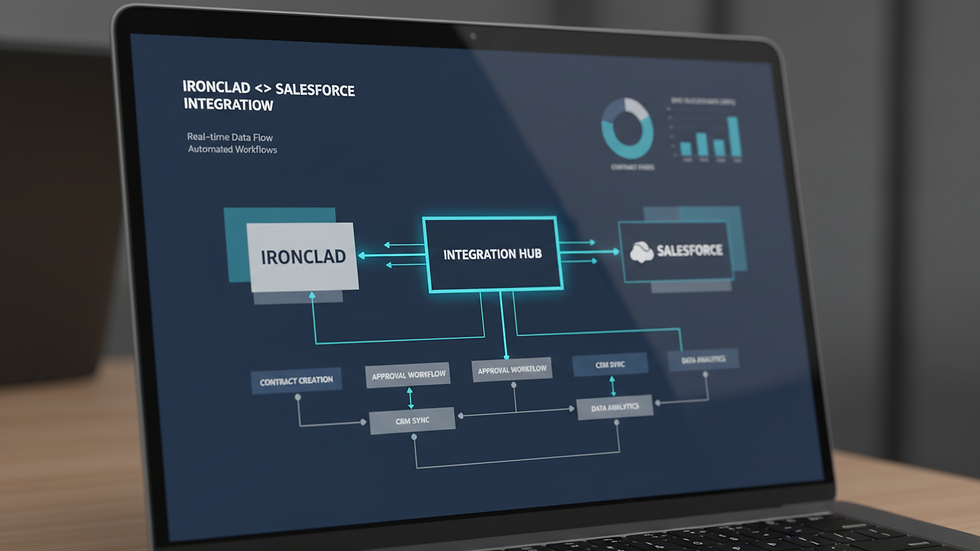
Integrate with core business systems. Connect Ironclad with Salesforce for opportunity tracking, Coupa for procurement spend visibility, and NetSuite for financial reconciliation. I've built this out to the point of a full Ironclad/Salesforce CPQ integration supporting SOX-compliant strategic deals — these integrations provide a single source of truth and materially improve data accuracy.
Monitor system performance and user adoption. Use built-in analytics and reporting tools to track contract volume, cycle times, and bottlenecks. Review these metrics regularly to identify where the process is actually breaking down, not where you assume it is.
Provide ongoing training and support. Make sure users understand system capabilities and best practices. Regular training sessions and clear documentation are what keep adoption rates high after the initial rollout excitement fades.
Implementing these tips takes a hands-on approach and continuous refinement. Combining technical expertise with a deep understanding of contract workflows is what consistently produces the best outcomes.
Not sure where your own CLM setup stands? Start with a free CLM Readiness Assessment to see where the gaps are before you invest in a bigger fix. |

Who are the top CLM vendors?
When selecting a CLM system, it is important to consider vendors that offer robust features and strong integration capabilities. Based on my experience, the following vendors stand out:
Ironclad: Known for its user-friendly interface and powerful automation features. Ironclad excels in integrating with Salesforce, Coupa, and NetSuite, making it a preferred choice for enterprises.
Agiloft: Offers highly customizable workflows and strong compliance management. It is suitable for organizations with complex contract requirements.
DocuSign CLM: Integrates well with e-signature workflows and provides solid contract lifecycle features.
Icertis: Focuses on enterprise-grade contract management with AI-driven insights and analytics.
Conga Contracts: Provides end-to-end contract management with strong document generation and reporting tools.
Each vendor has strengths and weaknesses. The choice depends on your organization’s specific needs, existing technology stack, and integration requirements. For enterprises heavily invested in Salesforce, Ironclad’s native integration is a significant advantage.
What to look for in a CLM vendor
When selecting a CLM system, the vendor name matters less than whether the platform actually fits your technology stack and workflow complexity. A few criteria I use when advising clients:
Integration depth, not just integration marketing. Ask to see how far the two-way sync with your CRM, procurement, and ERP systems actually goes — not just whether a connector exists.
Automation and approval-routing flexibility. Can the platform handle multi-step, conditional workflows without custom development for every exception?
Compliance and audit-trail support. Especially important for regulated industries or SOX-relevant contract data.
Implementation and partner ecosystem. A platform with certified implementation partners — rather than DIY-only rollout — tends to go live faster and with fewer rework cycles.
For enterprises already running on Salesforce — and especially those that also need procurement (Coupa) or financial (NetSuite) integration — Ironclad's native connectors and Workato-orchestrated automation typically require less custom engineering than comparable platforms. That combination is a big part of why I've built my practice around it.
Best practices for integrating Ironclad with Salesforce, Coupa, and NetSuite
Integration is often the most challenging part of enterprise CLM administration. I've worked on multiple projects where the success of the CLM rollout hinged entirely on seamless data flow between Ironclad and other enterprise systems. The practices below are what I follow on every engagement:
Map data fields carefully. Make sure contract metadata in Ironclad matches the corresponding fields in Salesforce, Coupa, and NetSuite. This single step prevents most downstream data mismatches.
Use middleware like Workato for complex workflows. Workato can orchestrate multi-step processes, such as triggering contract creation in Ironclad when a Salesforce opportunity reaches a certain stage. On a recent zero-downtime migration spanning 350+ Ironclad users, Workato orchestration is what let contract data, Salesforce opportunity updates, and NetSuite reconciliation move in lockstep during cutover — without a service interruption for the legal team.
Test integrations thoroughly before go-live. Run end-to-end tests with real-world scenarios to catch issues early, not after contracts are already flowing through the system.
Set up error monitoring and alerts. Use logging and notifications to catch and resolve integration failures quickly, before they become a backlog.
Document integration workflows and dependencies. Clear documentation is what lets an IT team maintain and troubleshoot the integration long after the consultant who built it has moved on.
Following these practices is how I've helped organizations cut contract processing delays and improve data accuracy across systems — not through guesswork, but through the same sequence every time.
Managing user adoption and change management
Even the best CLM system will fail if users do not adopt it properly. I emphasize the importance of change management in every implementation.
Key steps include:
Engage stakeholders early. Involve legal, procurement, and IT teams in the design and configuration phases to ensure the system meets their needs.
Communicate benefits clearly. Explain how the CLM system will reduce manual work and improve contract visibility.
Provide role-based training. Tailor training sessions to different user groups, focusing on their specific tasks and workflows.
Create quick reference guides and FAQs. These resources help users troubleshoot common issues independently.
Solicit feedback and iterate. Regularly gather user input and make system adjustments to improve usability.
Sustained user engagement is critical. I recommend establishing a CLM champion within each department to support ongoing adoption and serve as a liaison with the system administration team.
Maintaining system health and compliance
Ongoing system maintenance is essential to keep the CLM platform running smoothly and compliant with legal and regulatory requirements.
I focus on:
Regularly updating contract templates and workflows. Reflect changes in laws, policies, and business practices promptly.
Performing system audits. Review user access, contract data integrity, and workflow performance periodically.
Backing up contract data. Ensure contracts and metadata are securely backed up to prevent data loss.
Monitoring system logs and alerts. Detect and address errors or unusual activity quickly.
Coordinating with IT security teams. Maintain compliance with data privacy and security standards.
These practices reduce risk and ensure the CLM system continues to deliver value over time.
Moving forward with confidence in your CLM system
Mastering enterprise clm system administration requires a combination of technical skill, process knowledge, and user engagement. By applying the management tips and best practices I have shared, you can optimize your Ironclad CLM implementation and integrations with Salesforce, Coupa, NetSuite, and Workato.
The goal is to transform contracts from a bottleneck into a strategic asset that supports business growth and operational efficiency. With disciplined administration and continuous improvement, your CLM system can deliver measurable benefits and become a trusted tool across your organization.
If you're evaluating a new CLM rollout, cleaning up an existing Ironclad instance, or need a hands-on Ironclad SME for an integration project, let's talk — or start with a free CLM Readiness Assessment to see where your current setup stands.



Managing an enterprise contract lifecycle management system requires careful planning, consistent monitoring, and a clear understanding of business workflows. The fair play pro approach of balancing accuracy and accountability is relevant when improving system administration. Practical guidance like this can help professionals strengthen contract processes, reduce errors, and support smoother collaboration across departments.